

Finding reliable beginner friendly smart devices for stay at home parents saved my sanity when I was juggling a crying toddler and burning toast. You do not need an engineering degree to make your daily routine smoother. When you spend all day managing a busy household, simple tech tools take over the small, annoying chores so you can finally drink your morning coffee while it is still hot.
What to Look for in Beginner Friendly Smart Devices for Stay at Home Parents
Bringing new electronics into an already chaotic house sounds intimidating, but the right gear keeps things simple. Adding beginner friendly smart devices for stay at home parents to your home should solve tangible everyday friction points rather than creating new technical headaches. Look for gadgets that feature a straightforward plug-and-play setup straight out of the box without requiring extra bridge hardware.
Skip devices that force you into complex coding scripts or confusing multi-step configuration menus. Reliable Wi-Fi connectivity, responsive smartphone apps, and seamless compatibility with voice assistants like Alexa or Google Assistant make a massive difference. You want tools that work quietly in the background, withstand accidental drops, and give you immediate relief from repetitive manual chores.
Amazon Echo Show 8 for Central Family Management
Standing at the kitchen counter with flour-covered hands while managing two toddlers requires extra help. The Amazon Echo Show 8 acts as a visual command center where you can set multiple named cooking timers, check the weather, and play nursery rhymes hands-free. Having a clear screen lets you glance at your shared family calendar or stream a quick recipe video without picking up your phone.
The biggest strength here is reliable hands-free voice control that hears you even over running sink water. You can also drop in on compatible cameras or use the device as an intercom to call older kids downstairs for lunch. On the flip side, the home screen occasionally displays sponsored recipe cards or shopping suggestions, so you will want to spend five minutes in the settings menu toggling off unwanted content widgets.

Kasa Smart Wi-Fi Plugs for Hands-Free Lighting
Getting trapped under a sleeping infant in a pitch-black room happens to every stay-at-home parent at least once. Kasa Smart Wi-Fi Plugs turn standard floor lamps, white noise fans, or bottle warmers into connected gear you can operate from your phone. You simply plug them into your existing wall outlet, connect through the Kasa app, and assign them a name.
Using these plugs allows you to build customized automated schedules that dim living room lamps right as evening wind-down starts. I use one on our nursery lamp so it shuts off automatically at 8:00 PM without me stepping on a creaky floorboard. The minor downside is physical size. If you buy the older square models, they can partially crowd adjacent wall outlets, so grab the newer slim mini versions instead.
Eufy Video Doorbell 2K for Quiet Naptime Alerts
Nothing ruins an afternoon faster than a loud delivery driver ringing the chime right when your baby finally falls asleep. The Eufy Video Doorbell 2K solves this frustration by sending crisp video feeds and motion alerts straight to your phone. It stores video footage locally on an internal chime unit, which means you avoid recurring monthly cloud subscription fees.
My favorite feature is configuring silent notifications during scheduled nap hours. You can mute the mechanical chime entirely and receive a subtle vibration on your phone or smartwatch when someone approaches the porch. The only trade-off involves routine maintenance. Because it runs on a rechargeable battery, you must pop the doorbell off the doorframe every three to four months for a quick five-hour charge.
Roborock Q5 Robot Vacuum for Daily Crumb Control
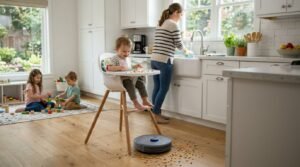
Toddlers treat floor space like an open-air cafeteria, scattering cereal, crackers, and dirt across every walkway. The Roborock Q5 uses precision lidar mapping to navigate your floor plan methodically, vacuuming carpets and hard surfaces without getting stuck on table legs. It creates an accurate digital map of your home on the first run, letting you label individual rooms.
The standout feature for parents is pinpoint zone cleaning after messy meals. You simply draw a small square under the high chair in the app, and the robot cleans up the mess while you wash dishes. You still need to do a quick sweep for stray charging cables or rogue baby socks before running it, because small fabric items will wrap around the main roller brush.
Hatch Rest Sound Machine for Smoother Bedtimes
Bedtime battles drain your energy faster than almost anything else during a long day at home. The Hatch Rest combines an adjustable night light, high-quality white noise machine, and time-to-rise trainer in one compact bedside cylinder. You control the color, volume, and sound profile directly from your smartphone without opening the nursery door and risking eye contact with a restless toddler.
Setting up custom time-to-rise programming helps early risers understand when it is okay to leave their room. You can program the light to stay soft amber overnight, then turn green at 7:00 AM so your toddler knows morning has officially started. The only annoyance is the persistent in-app prompt encouraging you to buy their premium Hatch Plus content subscription, though the built-in free sounds are more than enough.
Ecobee Smart Thermostat for Balanced Room Temperatures
Older houses often suffer from frustrating temperature swings between rooms, leaving nursery spaces either freezing cold or overly warm. The Ecobee Smart Thermostat resolves this issue by pairing with wireless satellite sensors you place in specific bedrooms. Instead of reading temperature solely in the main hallway, the thermostat balances heating and cooling based on where your family actually spends time.
Using these remote room sensors ensures your child’s bedroom stays at a safe, comfortable temperature all night long. You can adjust the climate from your phone without getting out of bed when an unexpected cold front hits at 2:00 AM. Installing the unit requires handling basic low-voltage thermostat wiring on your wall, but the included step-by-step mobile guide makes the process straightforward for beginners.

August Wi-Fi Smart Lock for Effortless Entry
Wrestling keys out of your pocket while balancing a toddler on your hip and carrying heavy grocery bags is an absolute nightmare. The August Wi-Fi Smart Lock mounts onto your existing interior deadbolt, meaning you keep your current exterior door hardware and original physical house keys. It connects directly to your home network without needing an external bridge accessory plugged into the hallway.
The highlight here is the reliable auto-unlock feature that detects your arrival via Bluetooth and Wi-Fi. The deadbolt unlocks automatically as you walk up the front steps, letting you push the door open with an elbow. Keep in mind that auto-unlock features use more battery power, so you will need to replace the internal CR123A batteries roughly twice a year.
Govee Smart Water Leak Detectors for Laundry Peace of Mind
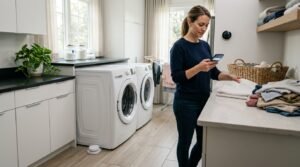
Washing machines in busy households run practically non-stop, increasing the chances of an unexpected hose failure or basin overflow. Govee Smart Water Leak Detectors are tiny battery-powered pucks that sit flat on the floor near water lines. They feature top and bottom sensor probes that detect standing water instantly.
These sensors sound a loud local alarm while sending instant moisture alerts straight to your phone through the Govee Home app. Slipping one behind the laundry machine, under the kitchen sink, and near the water heater protects your floors from expensive water damage while you are busy in another room. Initial pairing requires a 2.4 GHz Wi-Fi connection, which occasionally requires a router setting check if you run a mixed home network.
Practical Tips to Integrate Smart Tech Without Overwhelm
Starting your home automation journey does not require buying everything at once or rewiring your entire house. Investing in beginner friendly smart devices for stay at home parents yields the best results when you build slowly around your biggest daily bottlenecks. Pick one annoying friction point, like messy floors or dark hallway walks, and install a single dedicated tool to fix it.
Commit to a single ecosystem approach early on to keep your smart setup simple. Whether you prefer using Amazon Alexa, Google Home, or Apple Home, buying devices that work across your chosen platform keeps all your controls inside one central app. You avoid app fatigue, keep your partner on the same page, and maintain a calm, stress-free home environment.
Frequently Asked Questions
Are beginner friendly smart devices for stay at home parents difficult to install without help?
Most of these gadgets take less than ten minutes to set up. Brands design modern smart plugs, displays, and sensors for simple app pairing right from your phone. You only need basic tools for things like smart locks, while standard devices just plug directly into your existing wall outlets.
Do I need a central smart hub to connect these gadgets?
No, you do not need an expensive dedicated hub to run your home. Almost every modern beginner device connects straight to your home Wi-Fi network or pairs via Bluetooth. You manage everything using free companion apps on your smartphone or through a basic smart speaker you already own.
Will these devices still work if my home internet goes down?
Most smart plugs and locks retain their physical manual buttons, so you can still flip lights or turn deadbolts by hand. However, phone alerts, remote app access, and voice commands pause until your router reconnects. Basic schedules stored locally in certain hardware continue running uninterrupted.
Can other family members control these devices from their phones?
Yes, family sharing is standard across modern smart apps. You can invite your partner, grandparents, or babysitters through the device app by sending an email invite. They get full control over lights, locks, and temperatures without having to use your personal login credentials.
How do I prevent smart devices from disrupting baby sleep?
Turn off volume chimes and disable bright LED status lights in the companion app settings before putting devices in a child’s bedroom. You can also schedule automated quiet hours so doorbells and speakers do not broadcast loud visitor announcements during afternoon nap hours.
Conclusion
Taking care of a home and raising children is demanding enough without wrestling with complex technology. Picking just one or two simple gadgets takes genuine pressure off your daily routine and gives you back valuable minutes. Which room in your house causes you the most daily headaches?


